

As someone who relied on Mint for years, I was more than a little annoyed when Intuit announced in late 2023 that it would be shutting the service down. Like millions of other users, I appreciated how effortlessly Mint pulled all my accounts into one dashboard, tracked my credit score, monitored spending, and helped me set goals — from everyday budgeting to paying off my mortgage faster.
Once Mint’s closure became inevitable, I started searching for a worthy replacement. I tested Credit Karma, Intuit’s suggested alternative, but quickly realized it didn’t come close to filling Mint’s shoes. That sent me looking elsewhere. What follows is a breakdown of my hands-on experience with some of the most popular Mint alternatives, as I tried to find a new go-to budgeting app.
Even months after Mint’s shutdown, my top recommendation is still Quicken Simplifi. Its straightforward design, reliable income and bill detection, and reasonable pricing make it the closest overall substitute. That said, it’s far from the only good option — different apps shine depending on what you value most. If you’re also trying to move on from Mint, this guide should help you decide which of today’s best budgeting apps fits your needs.
Best Mint alternative overall
Quicken Simplifi
Monthly cost: $4
Tracks spending: Yes
Investment tracking: Yes
Links to bank accounts: Yes
Mobile app: iOS, Android
A polished, intuitive app that costs less than most competitors — and feels the most like Mint.
Pros
- Easy-to-use interface with a gentle learning curve
- Strong at identifying recurring income and bills
- More affordable than most alternatives
- Allows shared access with a spouse or financial advisor
- Useful refund-tracking feature
Cons
- No free trial
- No sign-in via Apple or Google accounts
- No Zillow integration
True to its name, Quicken Simplifi stands out for how uncomplicated it is. While other budgeting apps lean into flashy visuals, dark themes, or emoji-heavy customization, Simplifi opts for clarity. Its main dashboard is essentially a single scrollable page that surfaces everything important: account balances, net worth, recent spending, upcoming bills, your spending plan, top categories, achievements, and watchlists.
I also like how savings goals are handled in a dedicated section of the app, and how the visuals stay clean and approachable without ever feeling busy. Within a day or two, I felt comfortable navigating both the mobile and web versions — much faster than with some competitors (YNAB and Monarch, in particular).
Setup was largely smooth. Simplifi connected to Fidelity with no trouble, which isn’t always a given with budgeting apps. It’s also one of the few services I tested that lets you invite a spouse or financial advisor to share and manage your account. After using it for a few months, my main lingering gripe is the lack of Zillow integration for tracking home values. Since apps like Monarch Money and Copilot Money already support Zillow, the absence here feels like a missed opportunity. For now, real estate has to be entered manually, just like any other asset.
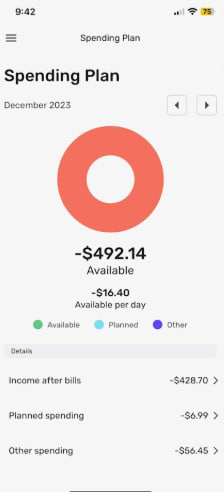
In day-to-day use, Simplifi did miscategorize a handful of my transactions, but no more than any other budgeting app I tested. One standout feature while reviewing transactions is the ability to flag purchases you expect to be refunded — something none of the other services offered. Simplifi was also better than most at estimating my regular income. What I valued most, though, was the flexibility around recurring expenses: you can mark specific purchases from a merchant as recurring without applying that rule to every transaction. For example, I could tag my Amazon Subscribe & Save orders as recurring while leaving the rest of my Amazon spending untouched.
The budgeting tools themselves are straightforward and flexible enough to suit most budgeting styles. After confirming that your income is correct, you set up recurring payments and identify which ones are bills versus subscriptions. This distinction matters because Simplifi shows both your total take-home income and an “income after bills” figure — the latter subtracts essential bills but not optional subscriptions. From there, you assign category-based spending targets under “planned spending,” which can include both ongoing budgets and one-time expenses. When you create a budget, Simplifi even suggests amounts based on your average spending over the past six months.
There are a couple of minor caveats worth noting. You can’t create an account using Apple or Google sign-in, and there’s no free trial — though Quicken does offer a 30-day money-back guarantee.
Best Mint alternative — runner-up
Monarch Money
Monthly cost: Starts at $9
Tracks spending: Yes
Investment tracking: Yes
Links to bank accounts: Yes
Mobile app: iOS, Android
A powerful budgeting app that’s more complex than our top pick, but still approachable — especially for power users.
Pros
- Extensive customization and detail
- Strong goals feature
- Ability to share access with others
- Chrome extension for importing Mint data
- Very thorough month-in-review summaries
- Automatic car value tracking
- Zillow integration
Cons
- Steeper learning curve than many competitors
- Mobile app feels more limited than the web version
- Doesn’t clearly separate bills from other recurring expenses
- Occasional mobile bugs when creating category rules
Monarch Money took some time to win me over. My initial impression was that it’s noticeably harder to use than apps like Simplifi, NerdWallet or Copilot — and that assessment wasn’t wrong. Tasks such as editing categories, setting up recurring transactions and creating rules feel more cumbersome than necessary, particularly on mobile. (I strongly recommend using the web app for detailed setup.) Monarch also struggled to accurately detect my income, requiring manual correction.
Once everything is configured, however, Monarch shines in terms of depth. Its budgeting section presents a clear balance sheet with budgeted versus actual spending by category, along with forecasts by month or year. Recurring expenses can be defined not only by merchant but also by other criteria. For instance, while most Amazon purchases might fall under “shopping,” specific recurring amounts — like $54.18 or $34.18 for baby supplies — can be automatically categorized and treated as recurring. Oddly, though, there’s no explicit way to label those recurring expenses as bills.
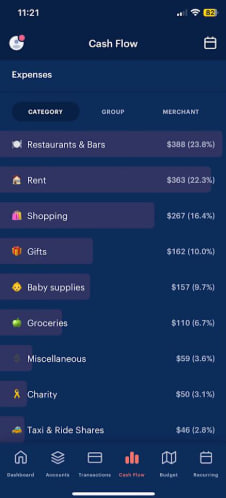
Not long after I first published this piece in December 2023, Monarch rolled out a robust reporting feature that lets users generate on-demand charts based on accounts, categories and tags. For now, this functionality is limited to the web app. In the same update, Monarch added support for an aggregator that can automatically refresh your car’s value. Paired with its existing Zillow integration for home values, this makes it easy to include illiquid assets like vehicles and real estate in your net worth calculations.
The mobile app is straightforward. The main dashboard displays your net worth, your four most recent transactions, a month-over-month spending comparison, month-to-date income, upcoming bills, an investment snapshot, any goals you’ve set and a link to your month-in-review. That recap is more comprehensive than most, covering cash flow, top income and expense categories, cash flow trends, changes in net worth, and detailed asset and liability breakdowns. In February 2024, Monarch enhanced its net worth graph so that tapping the Accounts tab shows changes over different time frames, including one month, three months, six months, a year or all time.
You’ll also find tabs for all account types, transactions, cash flow, budgeting and recurring payments. Like other apps in this space, Monarch can automatically identify recurring income and expenses, though it sometimes mislabels categories. Expense categories are represented with emoji, which you can customize if you like.
To connect financial institutions, Monarch relies on multiple networks, including Plaid, MX and Finicity, Mastercard’s competing aggregator. A late-December update made it easier to switch to MX or Finicity if Plaid fails. As with NerdWallet, I had to complete two-factor authentication nearly every time I added a new account. Monarch is also the only other app I tested that allows you to share access with someone else, such as a spouse or financial advisor. It also offers a Chrome extension to import Mint data, though that ultimately still requires downloading and uploading a CSV file.
Monarch recently added support for Apple Card, Apple Cash and Apple Savings accounts through new capabilities introduced with iOS 17.4. Copilot and YNAB have implemented similar features. Instead of manual statement uploads, these apps can now automatically sync balances and transaction history, making it easier to track Apple-based spending. Monarch has also launched investment transactions in beta and says that bill tracking and a revamped goals system are on the way, though no firm timeline has been shared.
Best up-and-comer: Copilot Money
Monthly cost: Starts at $8
Tracks spending: Yes
Investment tracking: Yes
Links to bank accounts: Yes
Mobile app: iOS
Copilot Money may be the best-designed budgeting app I tested. For now, it’s exclusive to iOS and macOS, though CEO Andres Ugarte has publicly said Android and web versions are coming. Until that happens, it’s hard to recommend Copilot broadly given the strength of its competitors.
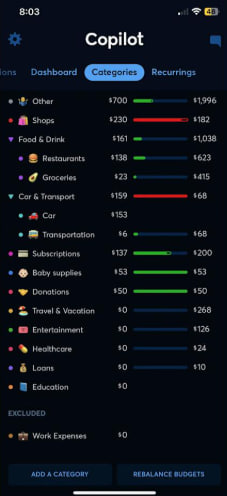
That said, it’s a compelling option. The app is fast, polished and visually engaging, using colors, emoji and charts to clearly show how you’re doing across budgets, investments and credit card balances. It’s especially strong at visualizing recurring monthly expenses.
Under the hood, Copilot’s AI-driven “Intelligence” improves over time as it learns how to categorize your spending. You can also create custom categories with your own emoji. While it’s not flawless and did misclassify some transactions, it’s easier to correct than most apps. The built-in search is also excellent, narrowing results almost instantly as you type.
Copilot also stands apart by offering direct integrations with Amazon and Venmo, which unlock more detailed transaction information. For Amazon, this simply involves signing in through an in-app browser. Venmo integration is a bit more hands-on: you need to add [email protected] as a forwarding address and create a rule that automatically forwards emails from [email protected]. As with Monarch Money, Copilot also supports Zillow integration, letting you add property you own and automatically track its estimated value inside the app.
Although much of Copilot’s workflow is automated, I liked that it flags new transactions for review. This helps catch fraudulent charges early and encourages a more mindful approach to spending.
Copilot has also followed Monarch’s lead in improving bank connectivity by supporting aggregators beyond Plaid. As part of that update, the company strengthened its connections to American Express and Fidelity — two institutions that often cause issues for budgeting apps. More recently, Copilot added a Mint import feature, something several competitors now offer as well.
Because Copilot is still relatively young — it launched in early 2020 — it’s continuing to build out some core features. Ugarte told me the team is close to finishing a more detailed cash flow section. According to Copilot’s website, a number of AI-driven tools are also in development, expanding on its existing “Intelligence” system for expense categorization. Planned additions include smart financial goals, natural language search, a chat interface, forecasting and benchmarking. That benchmarking feature is designed to show users how their spending and investment performance compares with others on the platform. Most of these updates are expected to roll out in the coming year.
Copilot also does a few clever things to attract new users. There’s a demo mode that lets you explore the app without linking any accounts, functioning almost like a simulation. The company is also offering two free months with the RIPMINT promo, which is more generous than most competitors’ trials. Once the trial ends, pricing comes in at $7.92 per month, which undercuts several rivals, though the $95 annual plan is broadly in line with the rest of the market.
Best free budgeting app
NerdWallet
Monthly cost: $0 | Tracks spending: Yes | Investment tracking: Yes | Links to bank accounts: Yes | Mobile app: iOS, Android
The strongest free budgeting app available, with few compromises beyond constant ads.
Pros
- Free
- Easy to use
- Helpful weekly insights
- Extensive library of financial explainers and guides
- One of the few options with credit score monitoring
Cons
- Ads everywhere
- No customization for spending categories
- Less accurate income detection
- Lengthy setup process
You may already know NerdWallet as a go-to source for personal finance advice, explainers and comparisons — it’s often one of the first results when you search for an unfamiliar financial term. What’s less well known is that NerdWallet also offers one of the only truly free budgeting apps I tested. There’s no paid tier and no locked features; everything is available upfront. The tradeoff, unsurprisingly, is ads — lots of them — though that was also true of Mint’s free version.
Despite the constant credit card offers, NerdWallet’s interface is clean and easy to navigate across both web and mobile. The app emphasizes a few key metrics: cash flow, net worth and credit score. While Mint offered credit score tracking, most of its competitors do not, which gives NerdWallet an edge here. I also liked the weekly insights, which highlight things like top spending categories and fees paid, and compare them to the previous month. And because NerdWallet is deeply rooted in financial education, it offers particularly detailed account categories during setup, such as distinguishing between Roth and non-Roth retirement accounts.
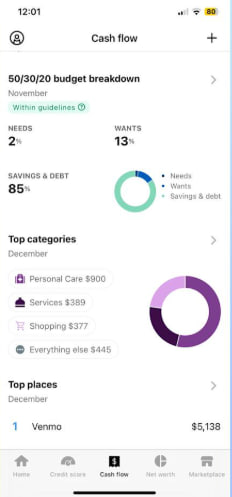
As a budgeting tool, NerdWallet gets the job done, though it feels fairly basic. Like most of the apps I tried, it lets you set up recurring bills. It’s built around the well-known 50/30/20 budgeting framework, which allocates 50 percent of your money to necessities, 30 percent to wants and 20 percent to savings or paying down debt. If that structure fits your needs, NerdWallet can work well — just be aware that it offers far less flexibility than many competitors. At the moment, you can’t create custom spending categories. A note in the app says customization is planned for the future, but there’s no timeline. You also can’t move expenses between “needs” and “wants,” though NerdWallet says this functionality will eventually be added. When asked, a company spokesperson declined to share when these features might arrive.
NerdWallet also stood out for having one of the most time-consuming setup processes of any app I tested. That said, it’s something you only have to deal with once, and it’s unlikely most people will be setting up as many apps simultaneously as I did. The biggest friction point was account linking: every time I tried to add a new account, I had to complete two-factor authentication just to get past the Plaid connection screen — on top of any 2FA required by my bank itself. According to Plaid, this extra step is a NerdWallet security requirement, not Plaid’s.
Because NerdWallet is one of the few budgeting apps that also provides credit score monitoring, it asks for more personal information during onboarding. This includes your date of birth, address, phone number and the last four digits of your Social Security number. Credit Karma follows a similar approach for the same reason.
Related to onboarding, I also noticed that NerdWallet struggled more than other apps to accurately identify my regular income. In my case, it mistakenly treated a large one-time wire transfer as income. Correcting this meant entering my income manually, which was mildly inconvenient since I needed to reference my pay stub to confirm the exact amount.
Mint alternative — honorable mention
YNAB
Monthly cost: Starts at $8 | Tracks spending: Yes | Investment tracking: Yes | Links to bank accounts: Yes | Mobile app: iOS, Android
A budgeting app with a devoted following that takes a very hands-on approach. Not ideal if you want something mostly automated.
Pros
- Strong focus on budgeting discipline
- Distinct zero-based budgeting system that many users swear by
Cons
- Steep learning curve
- Some features are easier to use on the web than on mobile
YNAB — short for You Need a Budget — openly positions itself as being unlike most budgeting apps. It uses a zero-based budgeting model, which requires you to assign a purpose to every dollar you currently have. A common analogy is the envelope system: each dollar goes into a specific envelope, and you can move money between envelopes when needed. These categories can cover fixed costs like rent and utilities, as well as irregular expenses such as holiday gifts or car repairs. The goal is to reduce financial surprises by planning for them in advance.
A key difference with YNAB is that it only focuses on the money you already have. It doesn’t rely on income forecasting or future paychecks, and it doesn’t require you to input your take-home pay or recurring income (though it’s possible if you want to). Income you expect to receive later in the month isn’t factored in, because forecasting isn’t part of YNAB’s philosophy.
YNAB is the most challenging app on this list to learn and demands consistent engagement from the user. The company is well aware of this and provides extensive tutorials and videos within both the mobile and web apps. While I never fully adjusted to the interface, I did come to respect YNAB’s emphasis on deliberate financial decisions. Having to actively build a new budget each month and review transactions isn’t necessarily a downside. As YNAB itself puts it, charts alone don’t stop overspending — intention does.
This approach may be especially useful for people with limited cash buffers or those trying to rein in problematic spending habits. My colleague Valentina Palladino, knowing I was working on this guide, wrote a thoughtful piece explaining why she’s relied on YNAB for years. If you’re saving for a major goal like a wedding or a home, her perspective is worth reading. Personally, though, I found YNAB’s system more involved than I needed.
Other Mint alternatives we tested
PocketGuard
PocketGuard was once a solid free budgeting app, but its free tier is now limited to a seven-day trial. After that, you’ll need to choose between a $13 monthly plan or a $75 annual subscription. When I tested it, it felt more limited than NerdWallet, though still functional. The main dashboard shows your net worth, assets and liabilities, monthly income and spending, upcoming bills, your next payday, any debt payoff plans and savings goals.
Like Quicken Simplifi, PocketGuard follows an “after bills” budgeting philosophy. You enter all your recurring expenses first, and the app shows you what’s left — that remaining amount is what you’re meant to budget for discretionary spending.
While the interface is easy enough to navigate, it lacks refinement. The accounts section feels cluttered and doesn’t clearly summarize totals for categories like cash or investments. Small issues — awkward phrasing, inconsistent punctuation — make the app feel less polished. I was also prompted multiple times to update the app when no update was actually available. The web version doesn’t improve much on the mobile experience, as it feels like a simple scaled-up version rather than something designed for a larger screen. With the free tier gone, PocketGuard no longer stands out the way it once did.

Each of the apps I tested uses the same underlying network, called Plaid, to pull in financial data, so it’s worth explaining in its own section what it is and how it works. Plaid was founded as a fintech startup in 2013 and is today the industry standard in connecting banks with third-party apps. Plaid works with over 12,000 financial institutions across the US, Canada and Europe. Additionally, more than 8,000 third-party apps and services rely on Plaid, the What is Plaid and how does it work?
All of the apps I tested rely on the same underlying network, Plaid, to pull in financial data, so it’s worth explaining what it is and how it functions. Plaid was founded as a fintech startup in 2013 and has since become the industry standard for connecting banks with third-party apps. According to the company, Plaid works with more than 12,000 financial institutions across the US, Canada and Europe, and over 8,000 third-party apps and services depend on it.
You don’t need a standalone Plaid app to use the service. Instead, the technology is built directly into many apps, including the budgeting tools featured in this guide. When you select the “add an account” option in one of these apps, you’ll see a list of commonly used banks, along with a search bar to find your institution. After selecting your bank, you’ll be prompted to enter your login credentials. If two-factor authentication is enabled, you’ll also need to provide a one-time passcode.
Acting as an intermediary, Plaid passes through data such as account balances, transaction history, account type, and routing or account numbers. Plaid uses encryption and says it does not sell or rent customer data to other companies. That said, it’s important to note that in 2022 Plaid agreed to pay $58 million in a class-action settlement over allegations that it collected more financial data than necessary. As part of that settlement, the company was required to adjust some of its business practices.
In a statement provided to Engadget, a Plaid spokesperson said the company continues to deny the allegations behind the lawsuit, adding that “the crux of the non-financial terms in the settlement are focused on us accelerating workstreams already underway related to giving people more transparency into Plaid’s role in connecting their accounts, and ensuring that our workstreams around data minimization remain on track.”
How to import your financial data from the Mint app
Mint users should start preparing their data for migration to a new budgeting app. Unfortunately, moving data from Mint isn’t as simple as signing in through a new app and clicking “import.” In practice, apps that claim to support Mint imports are asking you to upload a CSV file containing your transactions and related data.
To export your data from Mint, follow these steps:
- Sign in to Mint.com and click Transactions in the left-hand menu.
- Select a specific account or choose All accounts.
- Scroll down and look for the option that says “export [number] transactions” in smaller text.
- Your CSV file should then begin downloading.
Note: Exporting transactions on a per-account basis may take more time, but it can make setup easier if your new budgeting app requires transactions to be imported into matching accounts individually.
How we tested Mint alternatives
Before diving into budgeting apps, I did extensive research. To compile a list of services to test, I turned to Google, Reddit, App Store reviews and recommendations from friends and colleagues. Some of the apps I found were free, similar to Mint, and supported themselves through heavy advertising. Most, however, required paid subscriptions, typically costing up to $100 per year or around $15 per month. (Spoiler: my top pick costs less.)
Because this guide is aimed at helping Mint users find a long-term replacement, every app I tested needed to meet a few baseline requirements: the ability to import all account data into one place, provide budgeting tools and track spending, net worth and credit score. Unless otherwise noted, all of the apps are available on iOS, Android and the web.
After narrowing the list to six apps, I set about testing them thoroughly. To get a realistic sense of how each one performed, I added every financial account to every app, regardless of balance size or importance. What followed was a repetitive cycle of two-factor authentication — hours of entering passwords and one-time codes for the same banks over and over again. Ideally, this is something you’ll only have to do once.
What about Rocket Money?
Rocket Money is another free financial app that supports spending tracking, balance alerts and account linking. With a paid subscription, it can also help users cancel unwanted subscriptions. We didn’t test Rocket Money for this guide, but it may be considered in future updates.